

In our previous guide, Real Systems Built with SQLite, we explored how SQLite powers real-world applications across mobile apps, IoT systems, embedded devices, analytics tools, and edge computing platforms.
Now we will begin building one of those systems.
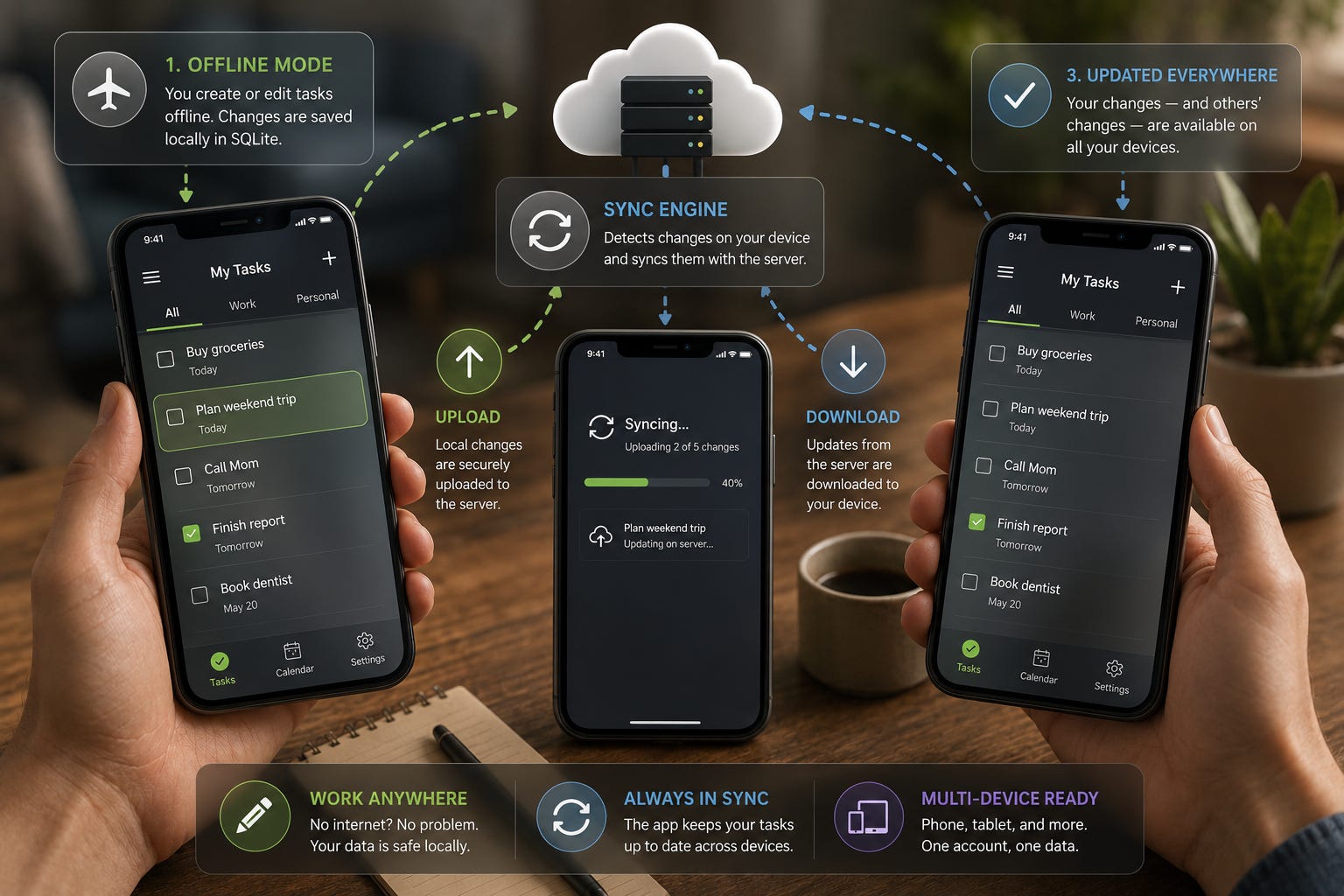
One of the most practical uses of SQLite is inside mobile applications. A mobile app cannot always depend on a stable internet connection. Users may lose signal while traveling, work in areas with poor connectivity, or open the app while completely offline.
Still, they expect the app to work.
They want to create notes, update tasks, save forms, check records, and continue working without interruption.
This is where a mobile sync engine becomes important.
A sync engine helps a mobile app:
Store data locally using SQLite
Track changes made on the device
Upload local changes to a remote server
Download updates made elsewhere
Handle conflicts when the same record changes in more than one place
In this guide, we will build the foundation of a mobile sync engine and understand how SQLite acts as the local infrastructure behind offline-first mobile applications.
Why Mobile Applications Need a Sync Engine
Imagine a task management app.
A user opens the app on their phone and creates a task:
Buy groceriesLater, they open the same app on a tablet.
Naturally, they expect the task to appear there too.
Now imagine a more complicated situation.
The phone was offline when the task was created. The tablet also made changes while offline. The server has not yet received updates from either device.
Without a sync engine, the app has no reliable way to decide:
What changed locally
What changed on the server
Which device has the latest version
Whether two versions conflict
What should be stored as the final record
A sync engine solves this problem by creating a controlled process for moving data between the local SQLite database and the remote server.
This pattern is common in:
Notes apps
To-do list apps
Field service apps
Mobile CRM systems
Inventory apps
Health tracking apps
Offline data collection tools
The key idea is simple:
The app should keep working locally first, then synchronize when the network is available.
This is often called offline-first architecture.
The Architecture We Will Build
Our mobile sync system has three main parts.
Mobile Device
The mobile device contains:
The user interface
The local SQLite database
The sync engine logic
SQLite stores the app data directly on the device. This allows the app to continue working even when the internet connection is unavailable.
Sync Engine
The sync engine sits between the local database and the server.
It is responsible for:
Detecting local changes
Preparing data for upload
Sending changes to the server
Downloading remote changes
Updating the local SQLite database
Handling conflicts
Think of the sync engine as the traffic controller for your data.
Remote Server
The remote server stores the shared version of the data.
It usually manages:
User accounts
API endpoints
Server-side validation
Shared records
Updates from multiple devices
A simple view looks like this:
Mobile App
   ↓
SQLite Database
   ↓
Sync Engine
   ↓
Remote Server
The mobile app uses SQLite for fast local access, while the sync engine keeps that local data connected to the wider system.
Designing the Local SQLite Database
Let us build a simple task table.
CREATE TABLE tasks (
    id TEXT PRIMARY KEY,
    title TEXT NOT NULL,
    completed INTEGER DEFAULT 0,
    updated_at INTEGER NOT NULL,
    sync_status TEXT NOT NULL
);
This table looks simple, but it includes important fields for synchronization.
id
In many local-only SQLite applications, developers use an auto-incrementing integer ID.
For sync systems, that can cause problems.
Why?
Because multiple devices may create records before speaking to the server.
For example:
Phone creates task 1
Tablet creates task 1
Both devices may accidentally create the same local ID.
To avoid this, sync systems commonly use unique text IDs, such as UUIDs.
Example:
task_7f2a9c88
task_b91d12ab
This allows each device to create records safely, even while offline.
updated_at
The updated_at column stores the last time the record changed.
This matters because sync engines often compare timestamps to decide:
What changed recently
Which version is newer
What should be uploaded
What should be downloaded
A timestamp is not a complete conflict resolution system by itself, but it is a useful starting point.
sync_status
The sync_status column tells the sync engine whether the row needs to be synchronized.
Common values include:
pending_insert
pending_update
pending_delete
synced
This allows the app to quickly find records that still need to be sent to the server.
Tracking Local Changes
The sync engine must know when something changes locally.
Suppose a user edits a task title.
The app updates the row:
UPDATE tasks
SET title = 'Buy groceries and milk',
    updated_at = 1735000000,
    sync_status = 'pending_update'
WHERE id = 'task_7f2a9c88';
Now the row clearly tells us:
The task changed
The change happened at a specific time
The change has not yet been sent to the server
When the sync engine runs, it can find this row using:
SELECT *
FROM tasks
WHERE sync_status != 'synced';
This is much better than scanning every record and guessing what changed.
Handling New Records
When a user creates a new task offline, the app inserts the row with a pending status.
INSERT INTO tasks (
    id,
    title,
    completed,
    updated_at,
    sync_status
)
VALUES (
    'task_9ab421',
    'Book dentist appointment',
    0,
    1735000300,
    'pending_insert'
);
The task is immediately available in the app because it is stored locally in SQLite.
The user does not need to wait for the server.
Later, when internet access returns, the sync engine uploads this task.
If the server accepts it, the app updates the status:
UPDATE tasks
SET sync_status = 'synced'
WHERE id = 'task_9ab421';
Handling Updates
Updates follow the same pattern.
When a user changes an existing task:
UPDATE tasks
SET completed = 1,
    updated_at = 1735000600,
    sync_status = 'pending_update'
WHERE id = 'task_9ab421';
The sync engine later sends the change to the server.
Once confirmed, the local record becomes synced again.
UPDATE tasks
SET sync_status = 'synced'
WHERE id = 'task_9ab421';
This pattern keeps the local database honest. The app always knows which records are clean and which records still need server confirmation.
Handling Deletes with Soft Deletion
Deleting data in a sync engine requires care.
If we simply remove a row from SQLite, the sync engine may forget that the row ever existed.
That means the server may never learn that the record was deleted.
A better approach is soft deletion.
Add a column:
ALTER TABLE tasks
ADD COLUMN is_deleted INTEGER DEFAULT 0;
Instead of deleting the row immediately, mark it as deleted:
UPDATE tasks
SET is_deleted = 1,
    updated_at = 1735000900,
    sync_status = 'pending_delete'
WHERE id = 'task_9ab421';
Now the sync engine can upload the delete operation to the server.
After the server confirms the deletion, the app can either:
Keep the deleted row for history
Remove it during cleanup
Archive it elsewhere
Soft deletion is very useful in mobile sync systems because it prevents lost delete events.
Creating a Sync Queue
For small apps, the sync_status column may be enough.
For larger apps, a separate sync queue is often better.
CREATE TABLE sync_queue (
    id INTEGER PRIMARY KEY AUTOINCREMENT,
    entity_type TEXT NOT NULL,
    entity_id TEXT NOT NULL,
    operation TEXT NOT NULL,
    created_at INTEGER NOT NULL,
    retry_count INTEGER DEFAULT 0
);
A queue gives the sync engine a clear list of work to process.
Example queue items:
tasks | task_1001 | insert
tasks | task_1002 | update
tasks | task_1003 | delete
This is useful because the sync engine can process changes in order.
A queue also makes retries easier. If an upload fails, the app can keep the queue item and try again later.
Uploading Changes to the Server
When the sync engine starts, it checks the queue or pending rows.
A simple upload flow looks like this:
Find pending changes
       ↓
Create API request
       ↓
Send data to server
       ↓
Server validates change
       ↓
Server confirms success
       ↓
Mark local row as synced
For example, the app may send a request like this:
{
  "id": "task_9ab421",
  "title": "Book dentist appointment",
  "completed": 0,
  "updated_at": 1735000300,
  "operation": "insert"
}
The server processes the change and returns success.
Then SQLite updates the local status.
This confirmation step matters. The app should not mark a record as synced before the server accepts it.
Downloading Changes from the Server
Sync is not only about uploading local changes.
The device must also download changes made elsewhere.
Example:
A user edits a task on their tablet
The server receives the update
The phone later downloads that update
To support this, the app needs to ask the server:
Give me all changes since my last sync.The app can store the last successful sync time in a small metadata table.
CREATE TABLE sync_metadata (
    key TEXT PRIMARY KEY,
    value TEXT NOT NULL
);
Example value:
last_sync_time = 1735000000When syncing, the app sends this value to the server.
The server responds with records changed after that time.
The app then applies those updates to SQLite.
Basic Conflict Resolution
Conflicts happen when the same record changes in two places before synchronization.
Example:
Phone changes task title to:
Buy milkTablet changes the same task title to:
Buy breadBoth devices were offline.
When both sync later, the system must decide which version wins.
Last Write Wins
The simplest method is last write wins.
This means the version with the newest updated_at timestamp becomes the final version.
This is easy to build and works well for simple apps.
However, it has a weakness.
One user’s change may be overwritten.
Server Wins
Another simple approach is server wins.
If there is a conflict, the server version stays.
This is predictable, but it can frustrate users if their local edits disappear.
Manual Resolution
For important data, manual resolution may be better.
The app can show both versions and ask the user what to keep.
This works well for:
Notes
Documents
Customer records
Medical or financial information
For this first version of the sync engine, last write wins is usually acceptable. In more advanced systems, conflict handling becomes a major design topic.
Handling Network Failures
Mobile networks are unreliable.
A sync engine must expect failure.
Problems may include:
No internet connection
Timeout errors
Server errors
Partial uploads
Authentication failures
SQLite helps because local data remains safe even if synchronization fails.
A failed sync should not destroy local work.
A basic retry strategy may look like this:
Sync failed
   ↓
Keep item in queue
   ↓
Increase retry count
   ↓
Try again later
The retry_count column in the sync queue helps track repeated failures.
Apps can also use backoff logic.
That means waiting longer between retries after repeated failures.
Example:
First retry: 10 seconds
Second retry: 30 seconds
Third retry: 2 minutes
Fourth retry: 10 minutes
This prevents the app from constantly hitting the server during outages.
Keeping the User Informed
A sync engine should not be invisible when something important happens.
Users should know whether their data is:
Saved locally
Waiting to sync
Fully synced
Failing to sync
A simple status message can improve trust.
Examples:
Saved on this device
Syncing...
All changes synced
Waiting for internet connection
Sync failed, will retry
This is especially important for business apps where users rely on data being saved correctly.
Security Considerations
A sync engine moves data between a device and a server, so security matters.
At minimum, a production app should use:
HTTPS for all network communication
Authentication tokens
Server-side permission checks
Careful handling of sensitive local data
If the app stores private or sensitive information locally, developers should also consider encryption.
SQLite itself stores data in a local file. Depending on the app, device-level security may not be enough.
Security should be designed early, not added later as an afterthought.
Putting the Sync Flow Together
Here is the full basic flow:
User changes data
       ↓
SQLite stores the change
       ↓
Record marked as pending
       ↓
Sync engine detects pending change
       ↓
Change uploaded to server
       ↓
Server confirms success
       ↓
Local record marked as synced
       ↓
Device downloads remote changes
       ↓
SQLite applies updates locally
This is the foundation of a mobile sync engine.
It is not yet a complete production system, but it gives us the core building blocks:
Local storage
Change tracking
Uploads
Downloads
Sync status
Retry handling
Basic conflict resolution
Why SQLite Works Well for Mobile Sync
SQLite is a strong fit for mobile sync engines because it is:
Local
Fast
Reliable
Lightweight
Easy to deploy
Available on mobile platforms
The app does not need a separate database server on the device.
It simply uses a local database file.
This makes SQLite ideal for offline-first applications where the local device must remain useful even without network access.
Conclusion
A mobile sync engine allows applications to work reliably across changing network conditions.
SQLite provides the local foundation.
The sync engine provides the coordination.
Together, they allow users to:
Work offline
Save changes locally
Sync later
Use multiple devices
Keep data consistent over time
The most important idea is this:
The mobile app should not stop working just because the network disappears.
By storing data locally in SQLite and carefully tracking changes, we can build applications that feel fast, reliable, and resilient.
This first version of the sync engine gives us a practical foundation. It handles local records, pending changes, uploads, downloads, retries, and basic conflict handling.
From here, we can make the system more efficient and production-ready.
Coming Ahead: Part 2
In Part 2, we will extend this mobile sync engine by implementing incremental synchronization.
Instead of downloading entire datasets repeatedly, the app will request only the records that changed since the last successful sync.
We will explore:
Last sync timestamps
Server-side change logs
Delta updates
Deleted record tracking
Efficient pull synchronization
Reducing bandwidth usage
Improving sync speed for large datasets
This will move our sync engine from a simple working model to a more scalable design suitable for real mobile applications.
Subscribe Now
Want to go beyond basic SQLite and build real-world systems that scale, sync, and perform reliably?
Subscribe to SQLite Forum and get practical, example-driven guides delivered straight to your inbox. Learn how to design smarter databases, handle distributed systems, and implement advanced patterns like replication, event sourcing, and offline-first architecture.
Join a growing community of developers using SQLite in ways most people never imagine.