

Phase 3: How SQLite Behaves Under Real Hardware Pressure
Imagine a remote weather monitoring station installed high in the mountains.
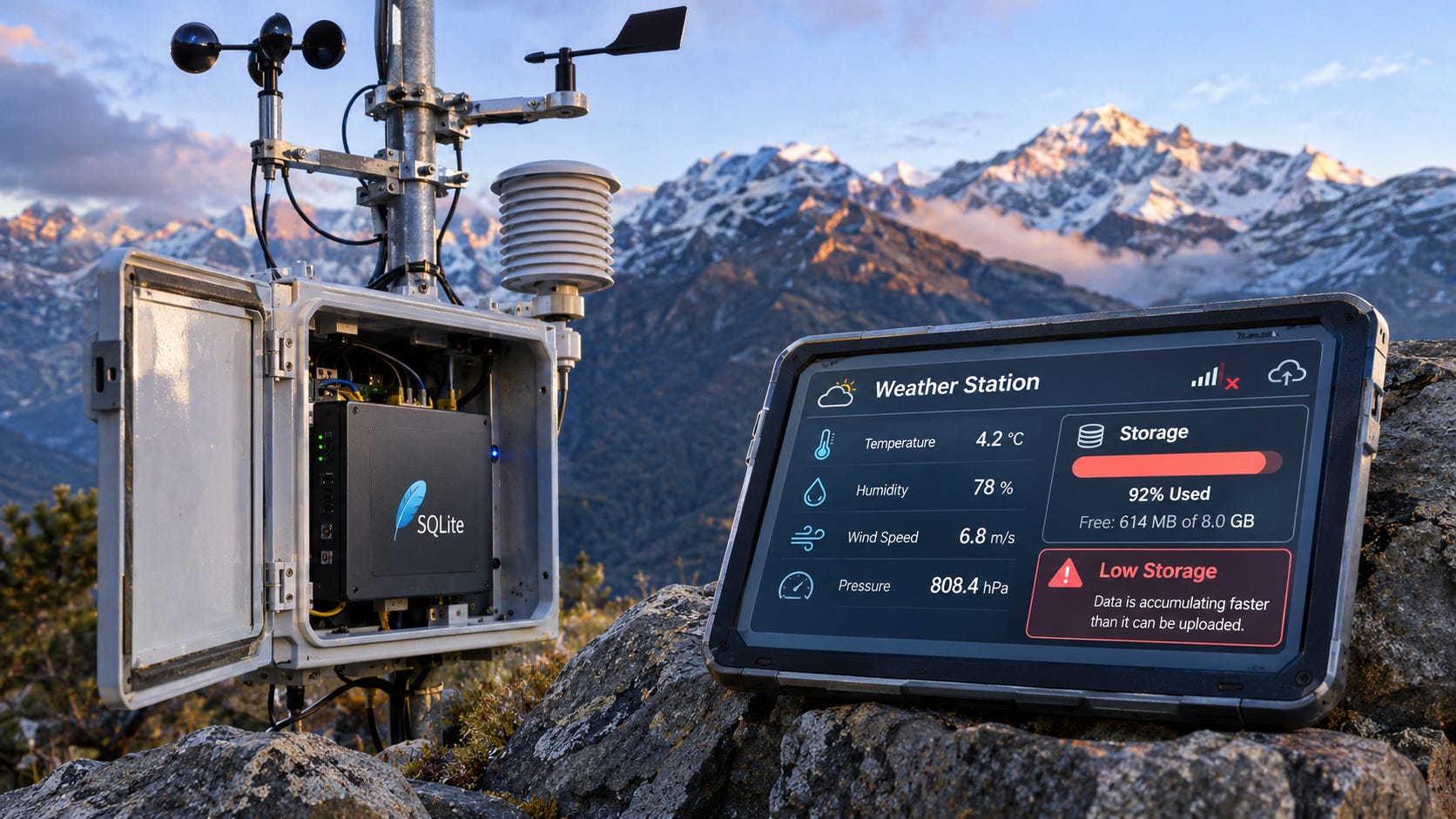
Every few seconds, the station measures temperature, humidity, wind speed, and atmospheric pressure. These readings are stored locally before being transmitted to a central monitoring system.
For months, everything works perfectly.
The device collects measurements, records them in SQLite, and periodically uploads historical data whenever a network connection becomes available.
But one day, something changes.
The network connection becomes unreliable. Sensor readings accumulate faster than they can be uploaded. Diagnostic logs grow. Temporary files consume additional storage.
Eventually, the device’s storage capacity approaches its limit.
At first, nothing appears wrong.
The application continues collecting readings. Queries still work. The database opens normally.
Then a transaction fails.
A sensor reading cannot be inserted. A synchronization operation cannot update its status. A background worker cannot record that it has completed an upload.
The application attempts to recover, but even its recovery procedure needs additional disk space.
Now the device faces a dangerous situation.
The database is still readable, but the application can no longer reliably make progress.
This is one of the most overlooked challenges in embedded SQLite applications.
Developers often focus on query performance, transaction safety, indexing, and concurrency. Storage capacity is frequently treated as an operational detail rather than an architectural constraint.
But SQLite operates on real storage devices with finite capacity.
When free space becomes scarce, database pages, indexes, WAL files, rollback journals, temporary files, and application logs compete for the same limited resources.
And simply deleting a few rows may not immediately return storage capacity to the operating system.
In our previous article, Designing Restart-Safe SQLite Applications, we explored how durable state machines, idempotent operations, and recovery procedures help applications resume safely after crashes and unexpected shutdowns.
Now we’ll examine a different failure scenario.
What happens when an application is still running, but the storage device is running out of space?
In this guide, we’ll build a practical storage-pressure management strategy using SQLite.
We’ll explore how SQLite consumes disk space, how to monitor database growth, how to implement retention policies, how to prevent unbounded queues, and how to recover safely when storage becomes critically limited.
Most importantly, we’ll design an application that responds to low-storage conditions before ordinary database writes begin to fail.
1. Why Disk-Space Pressure Is Different from a Database Crash
A database crash and a full storage device can produce similar symptoms, but they require different recovery strategies.
Consider an application that stores sensor readings.
Under normal conditions:
INSERT INTO SensorReadings (
    DeviceID,
    Temperature,
    RecordedAt
)
VALUES (
    101,
    24.8,
    1790000000000
);
The statement completes successfully.
But when the underlying filesystem cannot allocate the storage SQLite needs, the operation may fail with:
SQLITE_FULLThis SQLite result code indicates that the database or an associated file cannot grow as required, or that a relevant size limit has been reached.
Importantly, SQLITE_FULL does not always mean the entire physical disk is full.
It can also occur when SQLite reaches a configured maximum database size or another applicable storage limit.
The difference between a crash and storage exhaustion becomes clearer when we compare their effects.
Scenario                      Typical problem                   Recovery challenge
Application crash             Process stops unexpectedly        Resume unfinished operations
Power failure                 System loses power                Recover durable state
Database corruption           Stored structures are damaged     Restore or recover valid data
Disk-space exhaustion         New storage cannot be allocated   Restore writable capacity
Filesystem becomes read-only  Writes are rejected               Resolve underlying storage failure
A restart may help after an application crash.
But restarting an application does not create additional disk space.
If the storage device remains full, the same operations may fail again.
This means storage-pressure recovery must be designed as an ongoing operational process, not merely a startup procedure.
2. Understanding Where SQLite Uses Disk Space
Before designing storage limits, we need to understand what consumes space.
A SQLite database is more than its logical rows.
Depending on its configuration and workload, storage may be consumed by several files.
Main Database File
The primary database file stores database pages containing:
Table records
Index structures
Database metadata
Unused pages available for reuse
For example:
monitoring.dbThe size of this file is influenced by page size, schema design, indexes, and database maintenance.
Write-Ahead Log
When SQLite uses WAL mode, committed changes are initially recorded in a separate WAL file.
monitoring.db-walThe WAL can grow as transactions accumulate.
Checkpointing transfers committed changes into the main database, but checkpointing may require writes to database pages.
Long-running readers can also prevent a checkpoint from completing.
Shared-Memory File
WAL mode commonly uses a shared-memory file:
monitoring.db-shmThis file supports coordination and WAL indexing.
It is usually much smaller than the database or WAL, but still forms part of the storage environment.
Rollback Journals
When using rollback-journal modes, SQLite may create a journal file to support transaction rollback.
The amount of additional storage required depends on the journal mode and the pages modified.
Temporary Files
SQLite may use temporary storage for certain operations, including large sorts, temporary tables, and intermediate query results.
Whether temporary data resides in memory or on disk depends on configuration and workload.
Application Files
SQLite is rarely the only storage consumer.
Applications may also create:
Diagnostic logs
Export files
Downloaded updates
Temporary backups
Crash reports
Cached network responses
This leads to an important principle:
A SQLite database can encounter storage pressure even when its own file has barely grown.
Storage monitoring must consider the filesystem, not just the database.
3. Measuring SQLite Database Size
SQLite exposes useful information through PRAGMA statements.
Let’s start with a database page count.
PRAGMA page_count;Suppose the result is:
25000Next, inspect the page size.
PRAGMA page_size;Suppose the result is:
4096The approximate main database file size is:
Database Size = Page Count × Page Size

Database Size = 25,000 × 4,096

Database Size = 102,400,000 bytes
That is approximately 97.7 MiB.
The calculation measures the main database’s page allocation.
It does not include the WAL, shared-memory file, temporary files, or application logs.
Measuring Reusable Pages
SQLite also provides:
PRAGMA freelist_count;Suppose the result is:
4000These pages are currently unused within the database and can generally be reused by future database operations.
Approximate reusable space:
Reusable Space = 4,000 × 4,096

Reusable Space = 16,384,000 bytes
That is approximately 15.6 MiB.
This distinction matters.
A database may occupy nearly 100 MiB on disk while already containing substantial space available for reuse.
Deleting more rows may increase the freelist without reducing the database file’s physical size.
4. Why Deleting Rows Does Not Always Free Disk Space
Suppose a monitoring application stores millions of historical readings.
To reduce storage consumption, the application deletes old data.
DELETE FROM SensorReadings
WHERE RecordedAt < :cutoff;
The statement succeeds.
But when the application checks the database file, it may discover that the file has not become smaller.
Why?
SQLite commonly retains freed database pages for future reuse.
This is often desirable.
If new sensor readings arrive continuously, SQLite can reuse those pages instead of repeatedly extending the database file.
However, there is an important difference between:
Internal free space: Storage available for reuse inside the SQLite database.
Filesystem free space: Storage available to other files and applications.
Deleting rows may improve the first without immediately improving the second.
What About VACUUM?
SQLite provides:
VACUUM;This rebuilds the database to reclaim unused space and compact its contents.
But VACUUM itself requires additional storage.
For a large database on a nearly full device, it may be impossible to complete.
This creates a dangerous maintenance pattern:
Storage Nearly Full
        |
        v
Delete Old Records
        |
        v
Database File Remains Large
        |
        v
Attempt VACUUM
        |
        v
Insufficient Temporary Space
        |
        v
Maintenance Fails
Therefore, do not rely on emergency VACUUM as your primary low-storage recovery strategy.
Plan retention and space reclamation before storage becomes critically constrained.
5. Building a Practical Storage-Aware Telemetry Database
Let’s design a monitoring system for an industrial device.
The device collects readings, stores them locally, and uploads them to a remote server.
We’ll use two tables.
Sensor Readings
CREATE TABLE SensorReadings (
    ReadingID INTEGER PRIMARY KEY,

    DeviceID INTEGER NOT NULL,

    Temperature REAL NOT NULL,

    Humidity REAL NOT NULL,

    RecordedAt INTEGER NOT NULL,

    UploadedAt INTEGER
);
The UploadedAt field records whether a reading has been successfully synchronized.
A NULL value indicates that the reading has not yet been acknowledged by the server.
Storage Management State
CREATE TABLE StorageState (
    StateID INTEGER PRIMARY KEY
        CHECK (StateID = 1),

    PressureLevel TEXT NOT NULL
        CHECK (PressureLevel IN (
            'normal',
            'warning',
            'critical',
            'emergency'
        )),

    LastCheckedAt INTEGER NOT NULL,

    AvailableBytes INTEGER NOT NULL,

    LastCleanupAt INTEGER
);
Initialize the storage state:
INSERT INTO StorageState (
    StateID,
    PressureLevel,
    LastCheckedAt,
    AvailableBytes
)
VALUES (
    1,
    'normal',
    0,
    0
);
This table stores the application’s most recently observed storage condition.
It is not a substitute for measuring actual filesystem capacity.
The application must refresh these values using operating-system information.
Notice that we deliberately separate storage-pressure state from sensor data.
This allows monitoring and retention decisions to be managed independently of ordinary data collection.
6. Designing Storage Pressure Levels
A reliable application should not wait until the disk is completely full.
Instead, define several operational levels.
For illustration, consider a device with 8 GiB of usable storage.
Illustrative storage-pressure policy
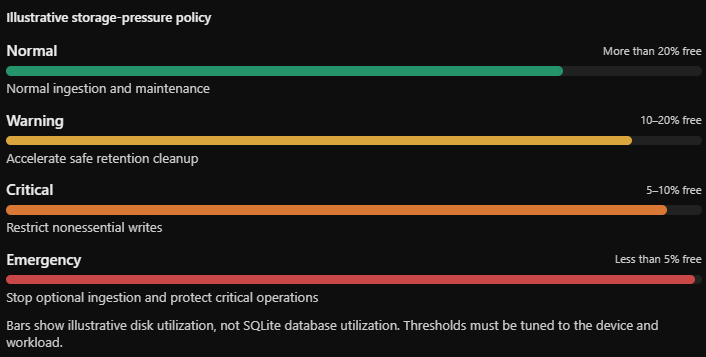
The policy might look like this:
Pressure level      Application behavior
Normal              Accept readings and perform scheduled maintenance
Warning             Increase monitoring and clean eligible historical data
Critical            Restrict optional writes and prioritize synchronization
Emergency           Stop nonessential ingestion and initiate controlled recovery
These thresholds are examples, not universal recommendations.
A device writing 100 MiB per hour needs a different safety margin from a device writing 100 MiB per minute.
A production policy should consider both remaining capacity and the rate at which storage is being consumed.
7. Measuring Filesystem Capacity from Python
SQLite can report database-page information, but it does not provide a general SQL command for measuring all available filesystem space.
The application can use the operating system.
In Python:
import shutil

def get_storage_status(path):
    total, used, free = shutil.disk_usage(path)

    return {
        "total_bytes": total,
        "used_bytes": used,
        "free_bytes": free,
        "free_percent": (
            free / total * 100
            if total else 0
        )
    }
Call it using the directory containing the SQLite database:
status = get_storage_status(
    "/var/lib/monitoring"
)

print(status)
Example output:
{
    "total_bytes": 8589934592,
    "used_bytes": 7730941133,
    "free_bytes": 858993459,
    "free_percent": 10.0
}
The device has approximately 10% free space.
The application can classify the condition:
def classify_pressure(free_percent):
    if free_percent < 5:
        return "emergency"

    if free_percent < 10:
        return "critical"

    if free_percent < 20:
        return "warning"

    return "normal"
Then persist the latest observation:
import sqlite3
import time

connection = sqlite3.connect("monitoring.db")

status = get_storage_status(
    "/var/lib/monitoring"
)

pressure = classify_pressure(
    status["free_percent"]
)

connection.execute("""
    UPDATE StorageState
    SET
        PressureLevel = ?,
        LastCheckedAt = ?,
        AvailableBytes = ?
    WHERE StateID = 1
""", (
    pressure,
    int(time.time() * 1000),
    status["free_bytes"]
))

connection.commit()
One important detail: writing the storage-status record itself consumes database resources.
When the filesystem is already exhausted, even this monitoring update may fail.
The application should retain the latest pressure reading in memory and continue reporting it through an available external monitoring channel if SQLite can no longer accept writes.
Also, percentage-based thresholds alone are insufficient on some devices.
Use an absolute minimum free-space requirement as well, especially when large transactions, checkpoints, or temporary files may need substantial capacity.
8. Implementing Safe Data Retention
A storage-aware application needs a clear retention policy.
In our earlier guide on Handling Large Datasets in SQLite: Techniques and Best Practices, we explored strategies for managing growing datasets efficiently. These principles become particularly important on storage-constrained devices, where uncontrolled data accumulation can eventually prevent critical database operations from completing.
For our monitoring device, assume:
Uploaded readings older than 30 days may be deleted.
Unuploaded readings must be preserved.
Recent readings remain available for local analysis.
Cleanup runs in small transactions.
First, create an index that supports retention cleanup:
CREATE INDEX idx_readings_retention
ON SensorReadings (
    RecordedAt,
    ReadingID
)
WHERE UploadedAt IS NOT NULL;
The partial index includes only uploaded readings.
Now identify eligible records:
SELECT ReadingID
FROM SensorReadings
WHERE UploadedAt IS NOT NULL
  AND RecordedAt < :cutoff
ORDER BY RecordedAt, ReadingID
LIMIT 1000;
Instead of deleting millions of rows in one transaction, delete small batches.
DELETE FROM SensorReadings
WHERE ReadingID IN (
    SELECT ReadingID
    FROM SensorReadings
    WHERE UploadedAt IS NOT NULL
      AND RecordedAt < :cutoff
    ORDER BY RecordedAt, ReadingID
    LIMIT 1000
);
The application can execute this statement repeatedly, committing after each batch.
Why Use Small Batches?
Large deletion transactions can:
Hold write locks for longer periods.
Generate substantial WAL activity.
Delay other database operations.
Increase the amount of work required during maintenance.
Small batches allow the application to pause between cleanup operations and recheck storage conditions.
However, deleting rows is not free.
The deletion itself modifies database pages and indexes.
Under severe storage pressure, cleanup transactions can also encounter SQLITE_FULL.
This is why retention should begin before the device reaches an emergency condition.
9. Preventing Unbounded Synchronization Queues
Offline-first applications face a particularly difficult storage problem.
Suppose a device produces 10,000 sensor readings every hour.
Normally, it uploads them shortly after collection.
But if the network remains unavailable for several days, the queue continues growing.
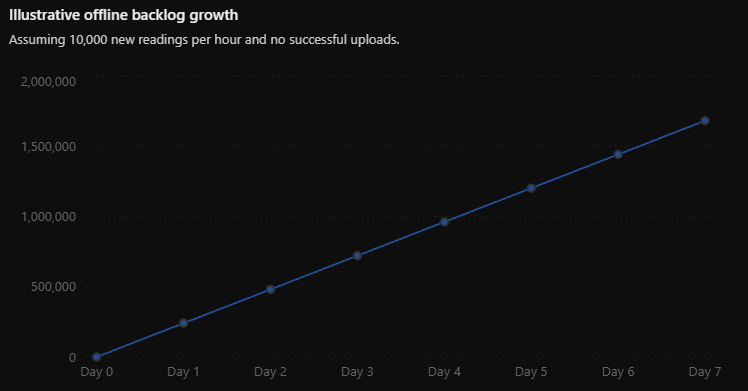
After seven days, the device may have accumulated 1.68 million unsynchronized readings.
Even if each reading is relatively small, the total storage requirement includes SQLite page overhead, indexes, WAL activity, and other application data.
A durable queue should therefore have a capacity policy.
Example: Queue Capacity Check
SELECT COUNT(*)
FROM SensorReadings
WHERE UploadedAt IS NULL;
The application can use this count to determine whether ingestion should continue normally.
For example:
MAX_PENDING_READINGS = 500000

pending = connection.execute("""
    SELECT COUNT(*)
    FROM SensorReadings
    WHERE UploadedAt IS NULL
""").fetchone()[0]

if pending >= MAX_PENDING_READINGS:
    print("Pending queue capacity reached")
A count-based limit is simple, but it is not enough by itself.
Actual disk consumption depends on record size and database structure.
A robust implementation combines queue limits with filesystem free-space measurements.
What Happens When the Queue Is Full?
That depends on the application’s data requirements.
Possible responses include:
Temporarily pause nonessential collection.
Reduce sampling frequency.
Aggregate readings into summaries.
Prioritize high-value sensor events.
Request an earlier synchronization attempt.
Alert operators that data collection is being restricted.
For safety-critical measurements, silently discarding unsynchronized data may be unacceptable.
The system must define its data-loss policy before deployment.
10. Downsampling Historical Sensor Data
Not every application needs to retain raw measurements indefinitely.
Suppose a temperature sensor records one reading every second.
That produces:
60 readings per minute
3,600 readings per hour
86,400 readings per day
For long-term historical analysis, a one-minute average may be sufficient.
Create a rollup table:
CREATE TABLE TemperatureRollups (
    DeviceID INTEGER NOT NULL,

    MinuteBucket INTEGER NOT NULL,

    AverageTemperature REAL NOT NULL,

    MinimumTemperature REAL NOT NULL,

    MaximumTemperature REAL NOT NULL,

    SampleCount INTEGER NOT NULL,

    PRIMARY KEY (
        DeviceID,
        MinuteBucket
    )
);
Generate summaries:
INSERT INTO TemperatureRollups (
    DeviceID,
    MinuteBucket,
    AverageTemperature,
    MinimumTemperature,
    MaximumTemperature,
    SampleCount
)
SELECT
    DeviceID,

    (RecordedAt / 60000) * 60000,

    AVG(Temperature),
    MIN(Temperature),
    MAX(Temperature),
    COUNT(*)

FROM SensorReadings

WHERE RecordedAt >= :start_time
  AND RecordedAt < :end_time

GROUP BY
    DeviceID,
    (RecordedAt / 60000)

ON CONFLICT (
    DeviceID,
    MinuteBucket
)
DO UPDATE SET
    AverageTemperature =
        excluded.AverageTemperature,

    MinimumTemperature =
        excluded.MinimumTemperature,

    MaximumTemperature =
        excluded.MaximumTemperature,

    SampleCount =
        excluded.SampleCount;
Here, timestamps use Unix milliseconds.
This example assumes each bucket is recomputed from its complete raw data. If readings can arrive late or buckets are only partially processed, the application must use a watermark or equivalent completion policy before deleting raw records.
Once a rollup is complete, validated, and durably committed, the application may delete raw readings according to its retention policy.
If raw readings must first be uploaded, that acknowledgment requirement still applies.
Downsampling can substantially reduce long-term storage requirements, but it should not silently discard information needed for auditing, synchronization, or incident investigation.
11. Managing WAL Growth Under Storage Pressure
In WAL mode, the write-ahead log may consume significant additional storage.
Our previous article on Checkpoint Algorithms and WAL Performance Tuning explored checkpoint modes, WAL growth, and the impact of long-running readers. Understanding these mechanisms is particularly important under storage pressure, where incomplete checkpoints and continued write activity can accelerate the consumption of available disk space.
Inspect the journal mode:
PRAGMA journal_mode;If WAL mode is active, the result is:
walSQLite provides checkpoint operations:
PRAGMA wal_checkpoint(PASSIVE);A passive checkpoint attempts to transfer WAL content without waiting for readers or writers that would prevent progress.
For maintenance operations, applications may use:
PRAGMA wal_checkpoint(TRUNCATE);A successful TRUNCATE checkpoint can reduce the WAL file to zero bytes.
However, it may need to wait for other database connections, and it can fail to complete when active readers or writers prevent the necessary checkpoint work.
The result of wal_checkpoint includes information about checkpoint status and progress.
Do not assume that issuing the command guarantees that the WAL has been truncated.
Why Checkpointing Is Not a Free-Space Emergency Fix
Checkpointing copies committed changes into the main database.
That operation may require database-file growth or other storage activity.
If the filesystem has no remaining capacity, the checkpoint itself may fail.
A better strategy is to manage WAL growth during normal operation.
For example:
PRAGMA wal_autocheckpoint = 1000;This sets an automatic checkpoint threshold of 1,000 WAL pages for the current connection.
It is a starting point, not a universal optimum.
Checkpoint behavior should be measured under the application’s actual workload.
Long-running read transactions should also be investigated, because they can prevent the WAL from being fully checkpointed.
WAL management is preventive maintenance, not a guaranteed last-minute rescue operation.
12. Using Incremental Auto-Vacuum for Planned Reclamation
SQLite supports an incremental auto-vacuum mode that can help reclaim unused pages without requiring a full database rebuild.
However, it must be enabled correctly.
For a new database, or an existing database that can undergo a one-time rebuild:
PRAGMA auto_vacuum = INCREMENTAL;For an existing database previously using NONE, changing the setting requires:
VACUUM;The database should be migrated while adequate free space is available.
Once incremental auto-vacuum is properly enabled, the application can reclaim free pages.
For example:
PRAGMA incremental_vacuum(100);This attempts to reclaim up to 100 free pages.
The actual number reclaimed depends on available free pages and database layout.
When Is This Useful?
Incremental auto-vacuum can be useful for applications that:
Continuously insert new data.
Periodically delete historical records.
Need controlled file-size reduction.
Cannot afford frequent full database rebuilds.
But it has tradeoffs.
Moving pages to reclaim space introduces additional writes and can contribute to fragmentation.
For flash-based devices, those writes matter.
Incremental auto-vacuum should therefore be evaluated against write endurance, latency, and workload characteristics.
It is not automatically better than retaining reusable pages inside a bounded database.
13. Implementing a Storage-Pressure Controller
Let’s combine the previous ideas into an application-level controller.
The controller will:
Measure filesystem capacity.
Classify the pressure level.
Perform eligible retention cleanup.
Restrict optional ingestion when necessary.
Report the current operating mode.
The following Python example assumes that the database schema already exists.
import os
import shutil
import sqlite3
import time

DATABASE = "/var/lib/monitoring/monitoring.db"

RETENTION_DAYS = 30
DELETE_BATCH_SIZE = 1000


def now_ms():
    return int(time.time() * 1000)


def get_free_percent():
    total, used, free = shutil.disk_usage(
        os.path.dirname(DATABASE)
    )

    return (free / total) * 100 if total else 0


def pressure_level(free_percent):
    if free_percent < 5:
        return "emergency"

    if free_percent < 10:
        return "critical"

    if free_percent < 20:
        return "warning"

    return "normal"


def cleanup_old_readings(connection):
    cutoff = now_ms() - (
        RETENTION_DAYS * 24 * 60 * 60 * 1000
    )

    cursor = connection.execute("""
        DELETE FROM SensorReadings
        WHERE ReadingID IN (
            SELECT ReadingID
            FROM SensorReadings
            WHERE UploadedAt IS NOT NULL
              AND RecordedAt < ?
            ORDER BY RecordedAt, ReadingID
            LIMIT ?
        )
    """, (cutoff, DELETE_BATCH_SIZE))

    connection.commit()

    return cursor.rowcount


def check_storage(connection):
    free_percent = get_free_percent()
    level = pressure_level(free_percent)

    if level == "normal":
        return {
            "level": level,
            "allow_optional_writes": True
        }

    if level == "warning":
        cleanup_old_readings(connection)

        return {
            "level": level,
            "allow_optional_writes": True
        }

    if level == "critical":
        cleanup_old_readings(connection)

        return {
            "level": level,
            "allow_optional_writes": False
        }

    return {
        "level": "emergency",
        "allow_optional_writes": False
    }
This controller demonstrates the policy, but a production implementation needs additional safeguards.
It should use absolute free-space thresholds, handle database errors, apply cleanup limits, and avoid allowing multiple cleanup workers to run simultaneously.
It should also consider how much free space may be consumed between the measurement and the next write.
A storage check is not a reservation.
Another process may consume the remaining capacity immediately after the check.
For that reason, every write must still handle storage-related failures correctly.
14. Handling SQLITE_FULL Without Losing Application State
Even with monitoring and preventive cleanup, writes may fail.
A reliable application must handle those failures explicitly.
In Python:
import sqlite3

def save_reading(
    connection,
    device_id,
    temperature,
    humidity,
    recorded_at
):
    try:
        with connection:
            connection.execute("""
                INSERT INTO SensorReadings (
                    DeviceID,
                    Temperature,
                    Humidity,
                    RecordedAt
                )
                VALUES (?, ?, ?, ?)
            """, (
                device_id,
                temperature,
                humidity,
                recorded_at
            ))

        return True

    except sqlite3.OperationalError as error:
        if (
            getattr(error, "sqlite_errorcode", None)
            == sqlite3.SQLITE_FULL
        ):
            print("SQLite storage limit reached")
            return False

        raise
Python’s sqlite_errorcode attribute is available on supported SQLite exceptions in Python 3.11 and later.
For older environments, error handling may require a different approach.
Why Transaction Handling Matters
A storage-full error can occur during a transaction.
SQLite documents that certain errors, including SQLITE_FULL, may cause a transaction to be rolled back automatically.
The application must not assume the transaction remains active or that partial work can simply continue.
Instead:
Stop the failed operation.
Determine the transaction’s current state.
Roll back if necessary and possible.
Avoid reporting success.
Preserve the input for retry if an independent durable source exists.
Retry only after storage conditions have improved.
If the reading exists only in memory when the insert fails, the application may lose it if the process stops.
That limitation cannot be solved by retry logic alone.
A system requiring lossless ingestion must provide sufficient storage headroom, an independent durable buffer, backpressure to the data producer, or another reliable persistence mechanism.
15. Why Emergency Cleanup Can Make Things Worse
It may seem logical to respond to a full disk by immediately deleting large amounts of data.
But database deletion itself requires writes.
For example:
DELETE FROM SensorReadings
WHERE RecordedAt < :cutoff;
SQLite must update table structures, indexes, and transactional metadata.
In WAL mode, these changes normally produce WAL frames.
If the WAL cannot grow, the deletion may fail.
Similarly, a large VACUUM operation may require far more temporary capacity than the device has available.
A safer emergency policy prioritizes operations according to their resource requirements.
For example:
Priority          Action
1                 Stop nonessential data generation
2                 Stop optional logs and exports
3                 Inspect available filesystem capacity
4                 Remove eligible non-database temporary files safely
5                 Retry small database cleanup operations when feasible
6                 Resume critical writes only after sufficient headroom returns
7                 Schedule database compaction during controlled maintenance
Never delete active SQLite WAL or journal files manually as a shortcut to reclaiming space.
These files may contain information required for database consistency and recovery.
Use SQLite’s supported transaction and checkpoint mechanisms instead.
16. Testing Storage Pressure Before Deployment
A storage-pressure strategy should be tested under controlled conditions.
Testing only with an almost-empty database does not reveal how the application behaves near capacity.
A useful test environment includes a disposable database on a filesystem with a controlled size limit.
For example, a Linux test system can use a dedicated loopback filesystem or another isolated storage environment.
The test should never be performed against production data or a shared filesystem.
Test 1: Normal Growth
Insert sensor readings at the expected production rate.
Measure:
Database growth
WAL growth
Free-space consumption
Transaction latency
Test 2: Network Outage
Disable synchronization.
Allow the pending queue to grow.
Verify that the application detects approaching capacity limits.
Test 3: Retention Cleanup
Populate the database with uploaded historical records.
Run cleanup in batches.
Verify that protected, unsynchronized records remain intact.
Test 4: Critical Storage Threshold
Reduce available filesystem capacity until the critical threshold is reached.
Verify that optional writes are restricted.
Test 5: Actual SQLITE_FULL
Use a disposable environment to force a write failure.
Verify that the application:
Detects the correct error.
Does not report a failed transaction as successful.
Handles transaction rollback safely.
Enters a controlled operating mode.
Can resume once sufficient capacity becomes available.
Test 6: Restart Under Low Storage
Restart the application while storage remains critically low.
Verify that startup recovery does not depend on successfully performing large database writes.
Test 7: Checkpoint Under Pressure
Create WAL activity and hold a long-running reader open.
Attempt checkpoint maintenance.
Verify that the application correctly handles incomplete checkpoints and does not assume the WAL has been truncated.
These tests reveal failure modes that ordinary database benchmarks may never encounter.
17. Monitoring Storage Pressure in Production
Storage-pressure management should produce actionable operational information.
In SQLite Performance Monitoring and Troubleshooting, we examined techniques for identifying database performance bottlenecks and operational problems. Extending these monitoring practices to include filesystem capacity, WAL growth, and storage consumption rates helps applications detect emerging storage problems before they escalate into transaction failures.
Useful metrics include:
Filesystem free bytes
Filesystem free percentage
Main database file size
WAL file size
Database freelist page count
Pending synchronization count
Oldest unsynchronized reading
Cleanup rows deleted per cycle
Number of
SQLITE_FULLfailuresTime spent in warning or critical mode
Storage growth rate
Estimated time until the next capacity threshold
The final two metrics are especially useful.
Suppose a device has 1 GiB of free space and consumes 100 MiB per hour.
At that rate, it has approximately ten hours before exhaustion, assuming consumption remains constant and no space is reclaimed.
But a device with the same free capacity consuming 10 MiB per hour has a much longer operating window.
This means free capacity alone is not enough to predict risk.
The application should consider both remaining capacity and consumption rate.
A Simple Growth Query
SQLite can help estimate how quickly its main database grows if the application periodically records measurements.
Create a monitoring table:
CREATE TABLE StorageMeasurements (
    MeasurementID INTEGER PRIMARY KEY,

    MeasuredAt INTEGER NOT NULL,

    DatabaseBytes INTEGER NOT NULL,

    WalBytes INTEGER NOT NULL,

    FreeBytes INTEGER NOT NULL
);
Store measurements periodically.
INSERT INTO StorageMeasurements (
    MeasuredAt,
    DatabaseBytes,
    WalBytes,
    FreeBytes
)
VALUES (
    :measured_at,
    :database_bytes,
    :wal_bytes,
    :free_bytes
);
Then inspect the trend:
SELECT
    MeasuredAt,
    DatabaseBytes,
    WalBytes,
    FreeBytes
FROM StorageMeasurements
ORDER BY MeasuredAt DESC
LIMIT 24;
A monitoring service can use these measurements to estimate growth rates and trigger alerts.
Be careful not to create an unbounded monitoring table while trying to prevent unbounded storage growth.
Monitoring data needs its own retention policy.
18. Common Mistakes When Managing SQLite Storage
Several approaches create unnecessary risk.
Waiting for SQLITE_FULL before taking action. By the time writes fail, cleanup and recovery may also be difficult.
Monitoring only the main database file. WAL files, temporary files, and application logs may consume significant additional storage.
Assuming DELETE reduces filesystem usage. Deleted pages are often retained for reuse inside SQLite.
Running VACUUM on an almost-full filesystem. The operation may require substantial additional space.
Deleting unsynchronized records to free capacity. This can cause permanent data loss.
Allowing offline queues to grow indefinitely. Network outages can eventually exhaust local storage.
Using only percentage-based thresholds. A small remaining percentage on a large device may represent substantial capacity, while the same percentage on a tiny device may be insufficient for one large transaction.
Ignoring storage consumption rate. A device with 10% free space may have minutes or weeks remaining, depending on workload.
Manually deleting WAL files. This can interfere with SQLite’s recovery mechanisms.
Assuming a failed write leaves the transaction usable. Certain SQLite errors may automatically roll back the transaction.
Making cleanup itself unbounded. Large deletion transactions can increase WAL activity and storage pressure.
Failing to test actual storage exhaustion. Many problems appear only when the filesystem cannot allocate additional space.
19. Best Practices for Storage-Aware SQLite Applications
For applications running on constrained storage:
Monitor filesystem capacity, database size, and WAL growth separately.
Define warning, critical, and emergency operating modes.
Use both percentage-based and absolute free-space thresholds.
Begin retention cleanup before storage becomes critically low.
Delete eligible historical data in small transactions.
Preserve unsynchronized and business-critical records.
Use bounded synchronization queues and explicit backpressure.
Downsample historical data when application requirements permit.
Avoid relying on emergency
VACUUM.Evaluate incremental auto-vacuum for workloads with regular retention cleanup.
Prevent long-running readers from causing uncontrolled WAL growth.
Handle
SQLITE_FULLas an expected operational failure.Never assume a free-space check guarantees the next write will succeed.
Make startup and recovery procedures tolerant of low-storage conditions.
Test storage exhaustion using disposable, capacity-limited environments.
Monitor storage growth trends and estimate remaining operating time.
Define clear data-loss and recovery policies before deployment.
Closing Thoughts
SQLite is designed to operate efficiently across a wide range of environments, from powerful servers to small embedded devices.
But even a carefully optimized database must operate within the limits of its storage hardware.
A full disk can interrupt transactions, prevent new sensor readings from being recorded, delay synchronization, interfere with checkpoints, and complicate application recovery.
The most effective solution is not a single SQLite setting.
It is a combination of storage monitoring, bounded data growth, retention policies, careful transaction design, and controlled operating modes.
By measuring available capacity, identifying storage growth early, and reducing nonessential writes before the filesystem becomes critically full, applications can avoid many preventable failures.
And when storage exhaustion does occur, a well-designed application can respond predictably rather than repeatedly attempting operations that cannot succeed.
The key principle is simple:
Storage capacity should be treated as a managed resource, not an unlimited assumption.
This becomes especially important in industrial monitoring systems, offline-first applications, IoT devices, remote installations, and other environments where storage cannot be expanded immediately.
Understanding disk-space pressure also brings us to another interesting aspect of SQLite’s internal architecture.
Not every SQLite table needs the same underlying storage structure.
And choosing the right table organization can influence database size, indexing overhead, and query performance.
That is where our next article takes us.
Coming Next: Using WITHOUT ROWID Tables in SQLite
Understanding when alternative table storage structures can reduce overhead and improve performance.
We’ll explore how SQLite organizes ordinary rowid tables, how WITHOUT ROWID changes the underlying B-tree structure, and when the alternative design makes sense.
We’ll also build practical examples, compare storage requirements, and benchmark different table designs to understand their real-world tradeoffs.
Subscribe Now
Build SQLite Applications That Stay Reliable Under Storage Pressure
Reliable database applications don’t wait for storage exhaustion to become a problem. They anticipate capacity limits, manage data growth, and protect critical operations before writes begin to fail.
Subscribe to SQLite Forum for practical tutorials on storage management, SQLite internals, WAL optimization, data retention, crash recovery, and production-ready database architecture.
Subscribe Now and build SQLite applications that remain dependable, even when hardware resources become critically limited.