

In Part 1, we built the foundation of a mobile sync engine using SQLite.
In Part 2, we improved synchronization by transferring only changed records through incremental synchronization.
In Part 3, we solved one of the biggest challenges in offline-first applications by implementing conflict detection and conflict resolution.
Our sync engine is now capable of:
Working offline
Tracking local changes
Synchronizing efficiently
Resolving conflicts
However, there is still one noticeable problem. The user has to think about synchronization. Perhaps they press a Sync button. Perhaps they manually retry failed uploads. Perhaps they wait until they remember to reconnect.
Modern mobile applications don’t work like that.
Apps such as Google Keep, Microsoft OneNote, WhatsApp, Notion, and countless others quietly synchronize data in the background without interrupting the user.
The best synchronization systems are almost invisible.
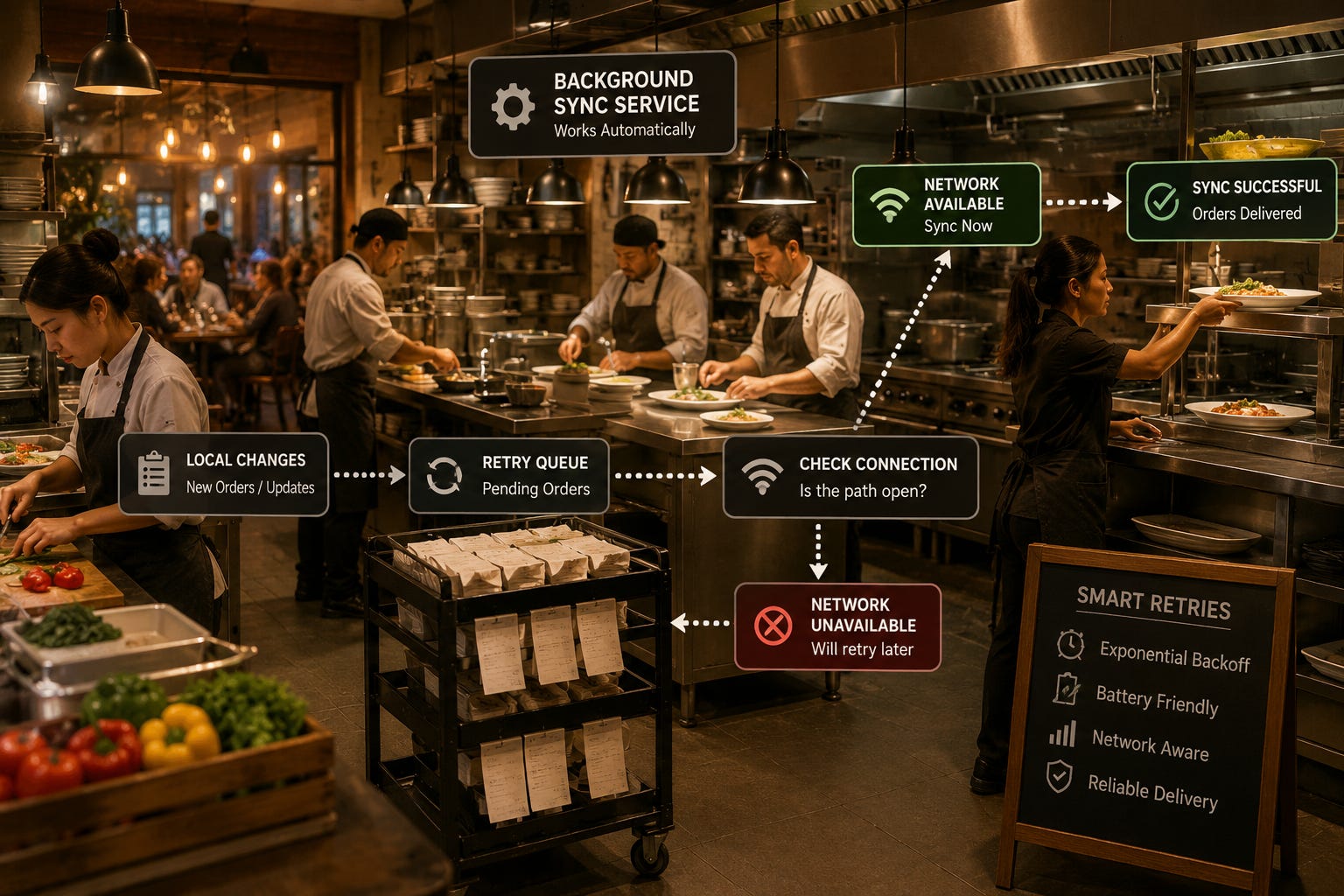
In this guide, we’ll transform our SQLite sync engine into a production-ready background service that automatically synchronizes data, retries failed operations, adapts to changing network conditions, and minimizes battery usage.
Why Background Synchronization Matters
Imagine you’re using a note-taking app.
You write:
Buy groceriesYou immediately close the app.
Ten minutes later, you open your tablet.
The note is already there.
You never pressed Sync.
You never waited for an upload.
It simply happened.
That seamless experience is made possible by a background synchronization service.
Instead of asking the user to synchronize manually, the application monitors changes and performs synchronization automatically whenever conditions are suitable.
What is a Background Sync Service?
A background sync service is a small component that runs independently from the main application.
Its responsibilities include:
Detecting local changes
Monitoring internet connectivity
Uploading pending records
Downloading server updates
Retrying failed requests
Recording synchronization status
The application continues responding to the user while synchronization happens quietly in the background.
A simplified architecture looks like this:
User
   ↓
SQLite Database
   ↓
Background Sync Service
   ↓
Remote Server
The user never interacts directly with the sync service.
Detecting Local Changes
Our SQLite database already tracks records that need synchronization.
For example:
pending_insert
pending_update
pending_delete
The background worker periodically checks for these records.
Example query:
SELECT *
FROM tasks
WHERE sync_status != 'synced';
If pending records exist, synchronization begins automatically.
Background Workers
Most mobile operating systems provide background execution frameworks.
Rather than creating an infinite loop, applications schedule background work that runs efficiently without draining the battery.
The workflow looks like:
Background Worker Starts
           ↓
Check Internet
           ↓
Check Pending Changes
           ↓
Synchronize
           ↓
Sleep
           ↓
Run Again Later
The worker wakes only when needed.
Scheduling Synchronization
Not every application needs to synchronize continuously.
Some apps synchronize:
Every few minutes
Every hour
When the app starts
When connectivity changes
After important user actions
For example:
User Saves Note
        ↓
Wait 15 Seconds
        ↓
Synchronize
Waiting briefly allows multiple changes to be grouped into a single request.
This reduces network traffic considerably.
Retry Queues
Network failures are inevitable.
Suppose the application uploads three records.
The connection disappears halfway through.
The sync engine should never lose those records.
Instead, they remain in a retry queue.
Example:
CREATE TABLE sync_queue (
    id INTEGER PRIMARY KEY,
    entity_id TEXT,
    operation TEXT,
    retry_count INTEGER DEFAULT 0,
    next_retry_at INTEGER
);
Every failed operation stays in the queue until it succeeds.
Nothing is lost.
Why Immediate Retries Are a Bad Idea
Imagine the server is temporarily unavailable.
Without any retry strategy:
Retry
Retry
Retry
Retry
Retry
Hundreds of unnecessary requests could be sent within seconds.
This wastes:
Battery
Mobile data
Server resources
A smarter approach is required.
Exponential Backoff
Production systems commonly use exponential backoff.
Instead of retrying immediately, each failure increases the waiting time.
Example:
Attempt 1
Wait 10 seconds

Attempt 2
Wait 30 seconds

Attempt 3
Wait 1 minute

Attempt 4
Wait 5 minutes

Attempt 5
Wait 15 minutes
If the server remains unavailable, the application quietly waits longer before trying again.
Once synchronization succeeds, the retry counter resets.
This simple technique dramatically improves reliability.
Detecting Connectivity Changes
A synchronization service should understand whether the device is online.
Instead of repeatedly attempting failed uploads, it should monitor connectivity.
Typical events include:
Offline
      ↓
Wi-Fi Connected
      ↓
Start Synchronization
or
Mobile Data Enabled
         ↓
Resume Synchronization
Waiting for connectivity avoids unnecessary failures and improves battery life.
Choosing Between Wi-Fi and Mobile Data
Some applications synchronize immediately regardless of network type.
Others allow users to choose.
For example:
Synchronize only on Wi-FiThis is useful when large files are involved.
Examples include:
Images
Videos
Audio recordings
Document attachments
Smaller updates, such as task lists or notes, can usually synchronize over mobile data without issue.
Providing users with this option improves flexibility and helps reduce unexpected data usage.
Optimizing Battery Usage
Synchronization consumes power.
Poorly designed sync engines may:
Wake the device too often
Perform unnecessary network requests
Drain the battery
Good background services minimize activity.
For example:
Instead of synchronizing after every keystroke:
H
He
Hel
Hell
Hello
the application waits until editing stops.
Then one synchronization request is sent.
Grouping changes into batches significantly reduces battery consumption.
Synchronizing in Batches
Suppose a user edits twenty tasks within five minutes.
Rather than sending twenty separate requests:
20 Upload Requeststhe sync engine combines them:
1 Batch UploadAdvantages include:
Faster synchronization
Lower network overhead
Reduced battery usage
Fewer server requests
Batch processing is common in production applications.
Monitoring Synchronization Health
Background synchronization should never become a mystery.
Applications should record useful statistics such as:
Last successful synchronization
Number of pending records
Failed uploads
Retry attempts
Last server response
A simple metadata table might include:
CREATE TABLE sync_status (
    key TEXT PRIMARY KEY,
    value TEXT
);
Example values:
last_sync = 1736000000
pending_changes = 5
last_error = Timeout
These values make troubleshooting much easier.
Logging and Diagnostics
When synchronization fails, developers need to understand why.
Instead of silently ignoring problems, record useful information.
Example log entries:
10:15 Upload Started

10:15 Server Responded 200 OK

10:16 Download Completed

10:17 Synchronization Finished
If something goes wrong:
10:20 Upload Failed

Reason:
Network Timeout
Good logging helps developers reproduce and solve issues quickly.
Handling Partial Synchronization
Sometimes synchronization stops halfway through.
Example:
Upload 100 Records

Completed:
75

Failed:
25
The sync engine should never restart from the beginning.
Instead:
Mark the first 75 as synchronized.
Keep the remaining 25 in the retry queue.
Resume later.
SQLite transactions make this process reliable.
Putting It All Together
Our production-ready synchronization service now follows this workflow:
User Updates Record
          ↓
SQLite Stores Change
          ↓
Background Worker Detects Changes
          ↓
Check Connectivity
          ↓
Upload Batch
          ↓
Retry Failed Requests
          ↓
Download Server Updates
          ↓
Update SQLite
          ↓
Record Sync Status
          ↓
Sleep Until Next Schedule
The entire process happens automatically.
Most users never notice it.
They simply experience applications that “always stay up to date.”
Best Practices
When building production background synchronization:
Synchronize automatically.
Batch multiple changes together.
Retry using exponential backoff.
Respect Wi-Fi and mobile data preferences.
Monitor connectivity before synchronizing.
Keep detailed logs.
Track synchronization health.
Use SQLite transactions to protect data consistency.
These practices make synchronization reliable, efficient, and nearly invisible.
Closing Thoughts
Building a sync engine is only the beginning.
Making it production-ready requires careful attention to reliability.
By introducing background workers, retry queues, exponential backoff, connectivity awareness, battery optimization, and monitoring, we’ve transformed our SQLite synchronization engine into a service that users rarely notice but depend on every day.
Applications that synchronize automatically feel faster, more reliable, and more professional because users can focus on their work rather than worrying about whether their data has been saved.
SQLite continues to provide the dependable local storage layer, while the background synchronization service quietly keeps every device connected and up to date.
Coming Ahead: Part 5
Our synchronization service is now automatic, efficient, and resilient.
The final step is preparing it for real-world production environments where security and scalability become just as important as synchronization itself.
In Part 5, we’ll secure and scale our SQLite mobile sync engine.
We’ll explore:
Device authentication
Secure API communication
HTTPS and encryption
Authentication tokens
Preventing duplicate requests
Idempotent API design
Handling thousands of concurrent devices
Monitoring production deployments
Building a synchronization architecture ready for real-world applications
By the end of Part 5, our mobile sync engine will evolve from a reliable synchronization system into a secure, scalable, production-ready solution suitable for modern mobile applications.
Subscribe Now
If you want practical, real-world SQLite architecture tutorials, subscribe to SQLite Forum. Subscribe to receive new articles directly.
Truly one of the Best Ever Series of articles on a Technical Subject. Thanks so much.